Phurpa Tsering
Where API Secrets Leak, and How to Keep Them in Your Vault
Most API keys don't leak from production. They leak from the tools we use to test production.
It usually starts with a small shortcut. You're debugging a request against the live API, so you paste the real token into the Authorization header, just to see what comes back. It works. You move on. Six months later that token is in your Git history, in a collection someone exported for a colleague, in a curl command in a Slack thread, and in a screenshot in a bug report.
Nobody decided to share it. The tool kept it, and then copied it every time the request was copied.
This post covers where secrets leak in API work, why the usual fixes only go part of the way, and how we handle it in Voiden: the request holds a reference to the secret, and the secret stays in your vault.
Where API secrets leak
Secret managers protect production well. Services read keys from HashiCorp Vault, Doppler or Infisical, nobody hardcodes them, and access is logged. Then a developer needs to call the same API by hand, and all of that is skipped. The key gets copied out of the vault and into the API client, where none of those protections apply.
From there, it spreads in the same few ways:
- Saved requests. The token is pasted into a header or an environment variable and saved with the request. Anything that copies the request now copies the token too.
- Sync and shared workspaces. If your client syncs to a vendor cloud, the token is now stored on someone else's servers. If the workspace is shared, or made public by mistake, everyone with access can read it.
- Exports. Collection exports are JSON files, and they're made to be passed around: attached to tickets, dropped in chat, committed to a repo "for reference".
- Committed files. A .env file that should have been ignored, a test fixture with a real key in it, an environment file someone forgot was private. Git keeps all of it, and deleting the file later doesn't remove it from history.
- Copy as curl. It's the fastest way to share a request, and it puts the resolved token right into the command, which then gets pasted into chat or docs.
- Screens and logs. Screen shares, demo recordings, screenshots in bug reports, console logs and request history. Anything that shows the request as sent shows the secret as well.
None of these is careless on its own. Each one is ordinary teamwork. The problem is that the secret travels with the request, and requests are meant to be shared.
This isn't hypothetical
30,000 public API workspaces. In December 2024, CloudSEK's researchers reported more than 30,000 public Postman workspaces exposing access tokens, refresh tokens and third-party API keys. Among them were Zendesk admin credentials that still worked and Razorpay payment API keys. Nobody published those keys on purpose. They were saved in requests and environments, and the workspaces were set to public instead of private. Postman responded with secret detection for public workspaces, but the pattern isn't specific to one tool: any client that stores the value will share it along with the request.
Five years on GitHub. In October 2022, Toyota disclosed that a subcontractor had published part of the T-Connect source code to a public GitHub repository in December 2017. The code included an access key to a customer data server. It stayed public until September 2022, and email addresses and customer numbers of up to 296,019 customers may have been exposed. Rotating the key took Toyota two days. Finding it took almost five years.
Leaked keys keep working. GitGuardian's State of Secrets Sprawl 2025 counted 23.8 million new secrets pushed to public GitHub repositories in 2024. Of the secrets it found leaked in 2022, 70% were still valid two years later. A leaked copy is rarely revoked, because nobody knows it exists.
Why the usual fixes only go part of the way
.gitignore only protects files you remember to add. It's a list of exceptions, so it relies on everyone getting it right every time. The first time someone saves a key into a file that isn't on the list, it gets committed.
Secret variable types still store the value. Many API clients let you mark a variable as secret. That usually masks it on screen, and sometimes keeps it out of sync or exports. That helps. But the value still lives in the client, as a copy of the real secret, and nothing updates that copy when the key is rotated.
Copies don't rotate. This is the part people underestimate. When your security team rotates a key in the vault, every copy in every API client is now either stale (and requests start failing) or still valid somewhere it shouldn't be. You can't revoke copies you don't know about.
Secret scanners catch leaks after they happen. Scanning commits for keys is worth doing. But by the time a scanner flags a key, it has already been pushed, and the fix is rotating it and cleaning up the history.
All of these fixes guard copies of the secret. Better to stop making copies.
The rule: store references, not secrets
Your services already work this way. They don't contain secrets, they contain the name of a secret, and they read the value from the vault when they need it.
An API client can do the same:
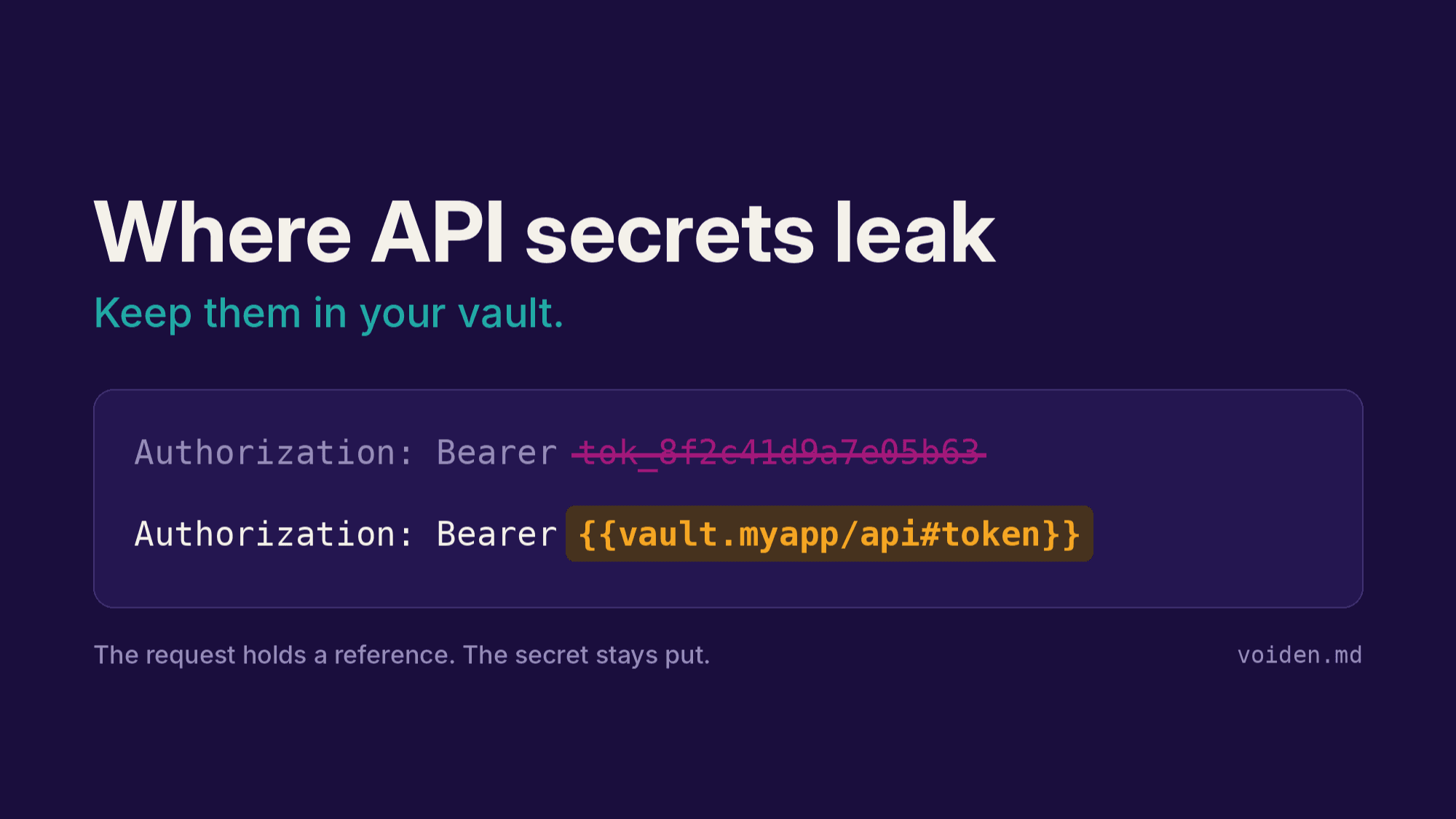
- The request holds a reference like {{vault.myapp/api#token}}, which is safe to commit, export and share.
- The value is read from the secret manager when the request is sent, and only then.
- Rotating the secret in the vault just works. There are no copies to update.
- Access is controlled by the vault. If someone doesn't have read access to myapp/api, the request in the shared repo is of no use to them, and nothing in it leaks the key.
Sharing the request no longer shares the key, because the key was never in it.
How it works in Voiden
Voiden stores requests as plain .void files in your repo, so it was always going to need an answer for secrets. Committing them was never an option. Voiden 2.4 added an API that lets plugins supply variables, and the Vault Secrets plugin uses it to resolve secrets from five secret managers:
| Provider | Reference | Good for |
|---|---|---|
| HashiCorp Vault | {{vault.path#field}} | Teams already on Vault (KV v1 or v2, Enterprise namespaces) |
| Doppler | {{doppler.NAME}} | Teams managing config per environment in Doppler |
| Infisical | {{infisical.NAME}} | Infisical Cloud or self-hosted |
| Bitwarden | {{bitwarden.Item#field}} | Personal or small-team secrets in a password manager |
| KeePassXC | {{keepass.Group/Entry#attr}} | Offline, local .kdbx databases |
1. Install the plugin
You need Voiden 2.4.0 or later. Open Extensions, search for Vault Secrets and install it. You can also download voiden-vault-secrets.zip from the latest GitHub release and use Extensions → ⋯ → Install from file.
A key icon appears in the top bar. Click it to open the plugin's settings.
2. Connect your secret manager
The settings page lists every provider on the left, with a status dot: hollow until it's set up, blue once it's set up, green after a successful read, red when the last read failed. Pick your provider and fill in the Connection tab. For HashiCorp Vault that's the address, a token, the KV mount and version.
Give the plugin the least access it needs. For Vault, that's a token that can only read the paths you reference:
path "secret/data/myapp/*" {
  capabilities = ["read"]
}
For Doppler, use a read-only service token scoped to one config. For Infisical, use a machine identity with read access to the project.
Save tests the connection right away. The tokens you enter are encrypted with your OS keychain (macOS Keychain, Windows DPAPI or libsecret on Linux) and stored outside your project. After saving, they show as Saved · encrypted and are never displayed again.
3. Reference secrets in a request
Open the Browse secrets tab to search what your provider holds and click a field to copy its reference. It shows names only, never values.
Then use the reference anywhere you'd use a variable: the URL, headers, query parameters or the body. For example, in the headers table of a request:
| Key | Value |
|---|---|
| Authorization | Bearer {{vault.myapp/api#token}} |
| X-DB-Password | {{vault.myapp/db#password}} |
Secret references are highlighted in amber, so you can tell them apart from ordinary environment variables at a glance. When you hit Send, Voiden reads the values from the vault and puts them into the outgoing request. Here an echo API sends back what it received:
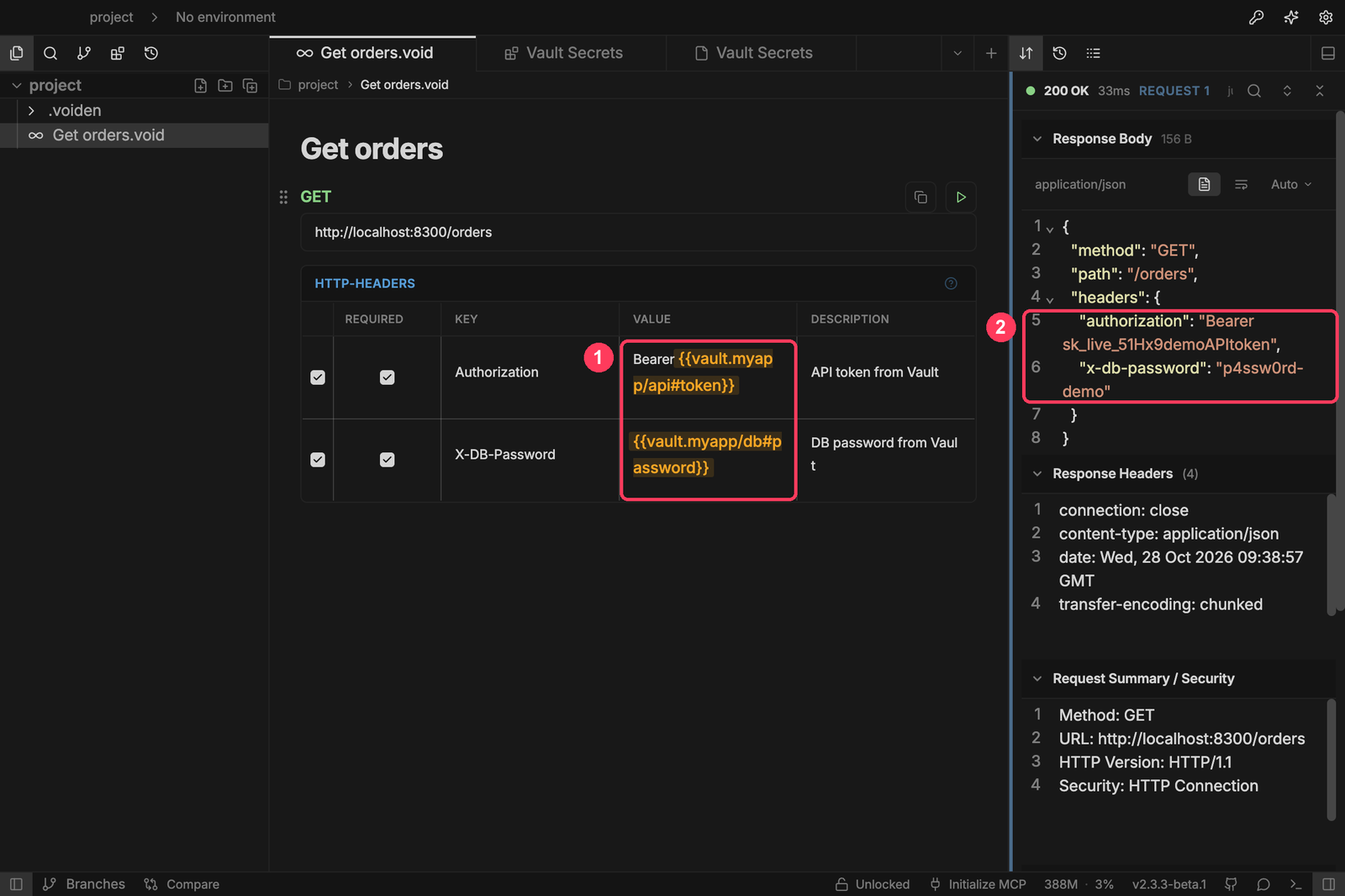
The .void file on disk still says {{vault.myapp/api#token}}. That's what gets committed and reviewed in the pull request.
4. When a secret can't be read, the request isn't sent
This matters more than it seems. If a secret can't be read, because the field is wrong, the token expired or the vault is locked, Voiden doesn't send the request. A request never goes out with a placeholder or an empty value in its Authorization header.
The error says what to fix. A wrong field name lists the fields that do exist:
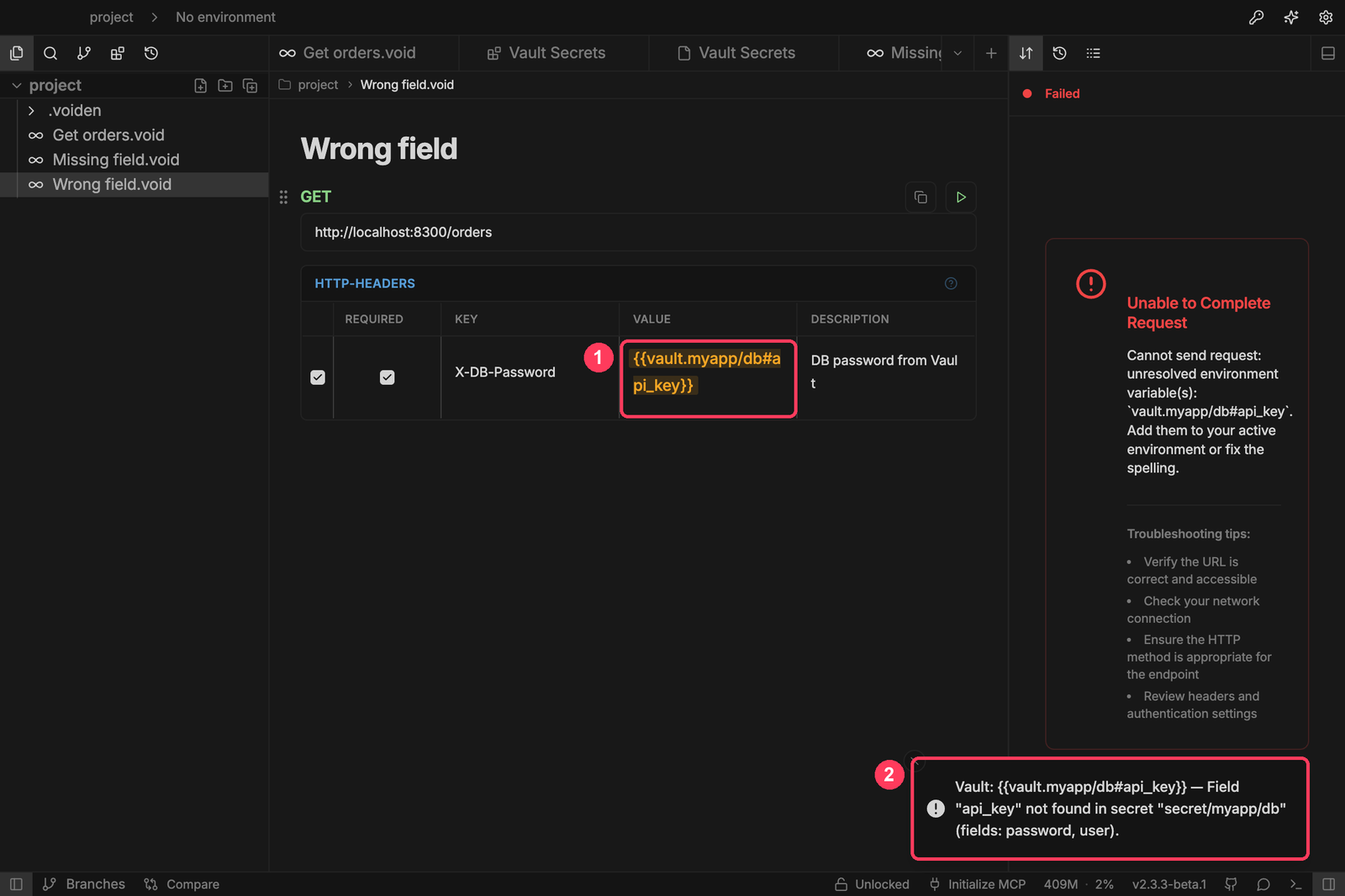
A rejected token says the token was rejected. A locked Bitwarden vault says to unlock it. A provider that isn't set up names the missing setting.
5. Use different sources per environment
Dev and production shouldn't read from the same place. Variables in your active Voiden environment override the plugin's saved settings, so each environment can point at its own Vault, Doppler config or Infisical environment:
# .voiden/env-public.yaml (committed: where to read from)
staging:
  displayName: "Staging"
  variables:
    VAULT_ADDR: "https://vault.staging.example.com"
    DOPPLER_CONFIG: "stg"
# .voiden/env-private.yaml (git-ignored: how to authenticate)
staging:
  variables:
    VAULT_TOKEN: "hvs.your-staging-token"
Switch to staging in Voiden, and the same request reads its secrets from the staging vault instead. Addresses and config names are fine to commit. Credentials like VAULT_TOKEN belong in env-private.yaml only, which is git-ignored. Or leave them out of environments entirely and keep them in the plugin's encrypted settings.
What it looks like day to day
A new teammate joins. They clone the repo, open Voiden and connect the plugin with their own Vault token. Every request in the project works on the first Send. Nobody has to send them the staging key in a DM, and there's no "ask someone for the env file" step in the onboarding doc.
Security rotates a key. The myapp/api token is rotated in Vault on a Tuesday morning. Nobody in the team changes anything. The next request reads the new value: within 60 seconds with the default cache, or straight away after clicking Clear. There are no old copies left in API clients that start failing, or worse, keep working.
A contractor's engagement ends. You revoke their Vault token. The .void files they cloned contain references only, so there's nothing in their copy of the repo or their API client to track down. (What they already sent or copied as cURL while they had access is a different matter. See the caveats below.)
A request goes into a pull request or a ticket. You paste the request into a bug report so a colleague can reproduce it. The reviewer sees Bearer {{vault.myapp/api#token}}, not the token. If they have access to that secret, they can run it. If they don't, the request is useless to them, and nothing leaked.
Staging and production stay apart. The same request file runs against staging all week. Switching the environment to production points it at the production vault, which only the people with production access can read. Nobody keeps a second, production copy of the collection with the real keys pasted in.
A freelancer keeps client keys offline. You work for three clients and keep each one's keys in a KeePassXC database on your laptop. Requests reference {{keepass.ClientA/Stripe#password}}, the database never leaves your machine, and handing the project over at the end means handing over files with no keys in them.
What it does under the hood
- The plugin talks to your secret manager from Voiden's main process, the Node.js side of the app. Your vault credentials stay there, and the secret browser only ever receives names, never values.
- Your vault credentials are encrypted at rest with the OS keychain and stored in Voiden's user data folder, outside your project.
- Secrets are cached in memory only, for 60 seconds by default, so a run of requests reads each secret once. Set the cache to 0 to turn it off, or click Clear right after rotating a key. Failed reads are never cached, and Bitwarden TOTP codes are fetched fresh every time.
- Your .void files only ever contain references. You can commit them, export them and paste them into a ticket.
Some caveats
A reference keeps the secret out of your files. It doesn't make the secret disappear: once a request is sent, the real value exists wherever that request is shown or recorded. In Voiden today, that means:
- The server you're calling sees it, of course, and so does anything that echoes the request back. Be careful with echo APIs, response panels and screen shares.
- Copy as cURL copies the real value. The command on your clipboard is ready to run, which means it contains the resolved token. Treat it like the secret itself, and don't paste it into chat or docs.
- Request history records the resolved request. History is off by default. If you turn it on, entries are saved as plain JSON in your project's .voiden/history/ folder for 2 days by default. If your project has a .gitignore, Voiden adds .voiden/* to it, so they aren't committed. They are still readable on disk. Leave history off for requests that use production secrets, or keep the retention short.
We're working on masking secret references in Copy as cURL and request history, so they keep the reference instead of the value.
A few more caveats:
- Bitwarden goes through bw serve, the Bitwarden CLI's local API. It has no authentication of its own, so anything running as your user can read an unlocked vault through it. Keep it bound to localhost and lock it when you're done.
- KeePassXC opens the database on every uncached read, which takes about a second with a strong key derivation setting. Leave caching on.
- This plugin needs Voiden 2.4.0 or later. On older versions it loads, but references stay unresolved and the settings page shows a warning.
Start with one key
You don't have to migrate everything at once. Pick the one token you've pasted into requests most often, put it in your secret manager (it's probably there already), and replace the pasted value with a reference. Then check your Git history for where that token used to live. If it's there, rotate it.
The plugin is open source under Apache-2.0. Support for more Vault auth methods (AppRole, OIDC) and Bitwarden Secrets Manager is on the roadmap. If your team uses a secret manager it doesn't support yet, open an issue. The plugin is built on Voiden's plugin SDK, so adding a provider is a small, contained change.
Related Posts
Davinder singh
Agents Live on the Error Path
An error that says what to do next is an instruction. Test it like one. What an agent needs from your API errors, where hints should stop, and how to keep error contracts from breaking.
Phurpa Tsering
Turn Your Tested API Requests Into Agent-Callable MCP Tools
Turn a request you've already tested into an MCP tool that agents can call, then publish it with @voiden/mcp. Use stdio for local use, or --http/--tunnel for a server you can host.
Phurpa Tsering
Bring Any MCP Server Into Your API Testing Workflow
Connect to any Streamable HTTP MCP server, browse its tools, resources, and prompts, and call one. Check the response with the same auth and assertion blocks you use for REST, all from a plain .void file.